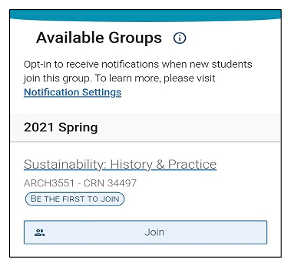
By joining the Study Buddies group for a class, you let other students know you're interested in studying together. Then, Study Buddies helps you connect with other interested classmates through email.
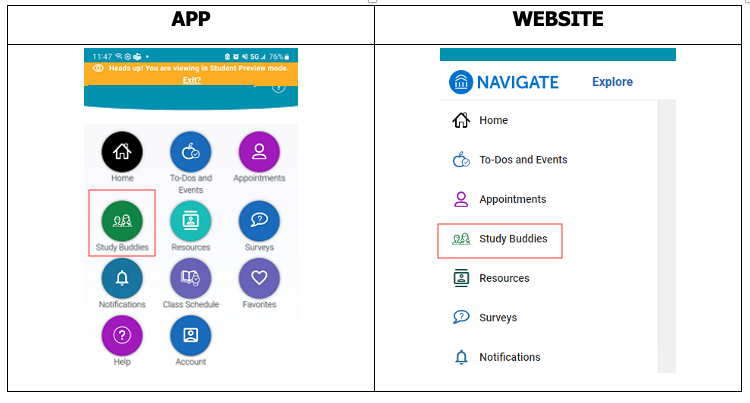
Click on the Study Buddies link on the Navigate home page. This can be done either from the app or your computer via the Navigate Student website.
You will see a list of your classes. Select Join if you want to join or start a study group for this class.
Students already in the group will get a notification that a new student has joined the group. Other students in your class section will be able to see your email address and reach out to you.
Once you've joined a group you can email one or more of the students by selecting their names using the check boxes.
After selecting classmates, your email app will open with a prepopulated subject and body text saying "Hey! Would you be interested in studying together for [class name here]?"
We value your privacy. We use and collect cookies and other technologies to understand & improve our website and provide personalized content.
Privacy Policy.
Cookie Preferences
Necessary
Required for the site to function. Cannot be disabled.
Preferences
Remembers your settings and personalizes your experience.
Statistics
Helps us understand how visitors interact with our site.
Marketing
Used to deliver relevant ads and track campaign performance.