{{active_alert.title}}
{{active_alert.message}} Last updated - {{active_alert.lastUpdated | date:'MMM d, yyyy h:mma'}}
{{active_alert.title}}
{{active_alert.message}} More Info Last updated - {{active_alert.lastUpdated | date:'MMM d, yyyy h:mma'}}

DegreeWorks is an easily accessible and user-friendly advisement tool. It compares your academic achievement to your major requirements as found in the college catalog.
DegreeWorks is accessible through the DegreeWorks tile of your CUNYfirst account or through the DegreeWorks page.

Registration information (i.e., grade changes, or classes added/dropped) is refreshed each night. Curriculum/Major changes generally take 24 — 48 hours after the change is entered in CUNYfirst.
Yes. DegreeWorks is laid out in block format displaying degree, skills, general education, and major requirements. Look for unchecked boxes to identify requirements that you still need to complete and green check marks for requirements you have already fulfilled.
The DegreeWorks audit is a tool to provide you with academic information related to your degree progress. It displays courses required and completed in your degree program. Your transcript is your official College record and provides a chronological list of courses you completed in semester order, and other academic information. Your official transcript must be requested through CUNY's vendor, Parchment. More information about transcript requests can be found here.
Several times a semester. You should always review your Audit:
Before you meet with your academic advisor to discuss registration for an upcoming semester.
After you register--to ensure that the courses you selected applied to your requirements like you thought they would, and that all of your scheduled courses apply to your major.
After your grades for each semester are posted.
Anytime you make a change to your schedule, or have questions about what you need to complete your degree, and
Whenever you are considering changing your major. You will want to check your current Audit to see where you stand, and then use the "What if?" tool to check out other majors.
Please note, it will take 24-48 hours for any schedule changes or final grades entered in CUNYfirst to reflect on the audit.
Please review our non-contributory course webpage for more information.
Elective Courses Allowed are classes that are contributory towards your degree and help you meet the overall total credit requirement.
Elective Courses Not Allowed are excess courses on your record that do not fulfill a major requirement. However, these classes may be needed to complete your degree and/or a declared academic minor.
This section is very important in DegreeWorks because it impacts financial aid and therefore the TAP award. The courses that plot in this category may not be required for your current major, and will therefore trigger a course ineligibility flag in the Financial Aid Certification & Tracking System (FACTS) for financial aid.
In some cases, a course may fall under the ECNA category but be needed to complete a degree requirement (i.e. Writing Intensive, Liberal Arts, Academic Minor, etc.). Students are advised to consult with their faculty advisor, as well as financial aid, before making changes to their registration.
The courses that plot under insufficient are included on your academic record and in most cases are factored into your cumulative grade point average (GPA). Courses deemed 'insufficient' do not count toward your total earned credits.
I see many course numbers listed in my DegreeWorks Audit. How can I find out what those courses are?
If you hover over any course number with your mouse, the name and credit hours for the course will display.
This is a wild card in DegreeWorks. It allows you many choices in a given subject area. For example, if the @ sign appears after a subject prefix i.e., ACC@, it means that you can take any Accounting course.
The additional flexible common core requirement can be fulfill by any course within the flexible core categories: World Cultures and Global Issues, U.S. Experience in its Diversity, Creative Expression, Individual and Society, or Scientific World unless otherwise specified. For more information on your general education, please see the Pathways area of our website.
In most cases, yes. DegreeWorks is programmed to recognize that some courses can fulfill more than one requirement. Courses are allowed to share between your major and either general education Pathways or general education College Option. We refer to this as double-duty.
For example, if your major requires BIO 1101 this course can be used to fulfill both your major requirement and your general education requirement. If you have any concerns about your DegreeWorks audit, check the requirements for your major in the College Catalog, before contacting your academic advisor.
"What if" is an option on the audit that allows students to look at how the courses they have taken would apply toward other majors. It does not change your major or your course history; it just allows you to see how your courses would apply if you decided to change your major.

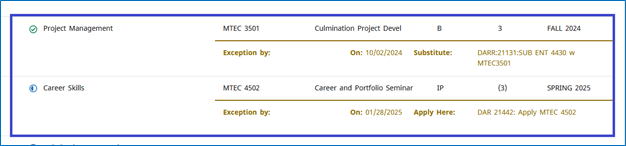
If your request to substitute a course is approved, the substitute course will be used to fulfill your requirement. The approval process can take 2-4 weeks. For questions about a pending substitution request, please contact your faculty advisor.
If you repeat a course in which you received an insufficient grade on the first attempt, the highest grade you earn will be the one that counts toward degree requirements. This will be the grade that appears on your worksheet as fulfilling the requirement.
If a grade of C or higher is required in a course, the attempt in which you earn the C or higher will plot to fulfill the requirement. Previous attempts in which you earn below the C will be placed in an "insufficient" category at the bottom of your worksheet. The courses in this area do not count toward your total credits, and they cannot be used to fulfill requirements.
If you repeat a course in which you received a passing grade on the first attempt and a minimum grade of C is not required, the original course will plot to fulfill the degree requirement.
Example, you receive a grade of C in BIO 2311, but you retake the course to get a higher grade. Upon completion of the second attempt, you earn a grade of A. The new grade will be factored into your GPA, but the C grade will still plot in DegreeWorks to fulfill the requirement. The second attempt, although a higher grade, will fall under insufficient with 0 credits. Both attempts of the course will be listed on your official transcript.
Once you formally declare an academic minor, a block will display in DegreeWorks. However, classes for your minor will not plot in that block. Any minor courses you were advised to take by the academic minor coordinator, will plot to fulfill an applicable general education requirement, an elective, or may plot as Elective Courses Not Allowed. Any minor course that plots under Elective Courses Not Allowed will still count towards your academic minor, but will not be deemed contributory for financial aid/TAP purposes. Students may be advised to take minor courses in addition to 12 contributory credits.

Approved e-Permit courses will not display in DegreeWorks until the course is completed at the host institution and the credits have been applied to your CUNYfirst record. You will see credits for the City Tech equivalent of the course, 24-28 hours after the completed permit course has been evaluated.
Degree progress is measured by completion of requirements and credits. As you progress through your degree, the percentage of completion will change. Once all requirements are checked off, final grades have been received, progress will update.
Please note, degrees are not automatically awarded and you must submit an Application for Degree in your final semester to be awarded your degree. DegreeWorks is used to gauge your eligibility and not the final determining factor in degree conferral. For more information about applying for graduation please speak with the Registrar's Office.
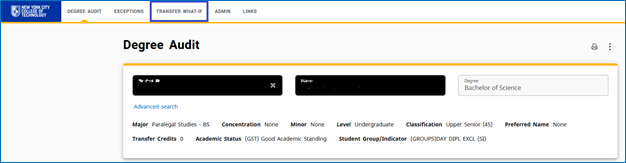
DegreeWorks has a ‘Transfer What If’ tool to help guide students. Access to the tool can be found at the top of your DegreeWorks audit, above your name. More information on how to use this tool can be found on the CUNY website.
Please ask your advisor for assistance. Below are the most common problems and courses of action:
If you have not officially changed your major, contact the Office of the Registrar to apply for a Change of Curriculum.
If you have already officially changed your major, understand that the DegreeWorks will NOT display your Audit in the new major until the effective term of the change. For example, if you change your major for Fall semester, you will not see the new major in your Audit until the beginning of the Fall semester.
Requirements for most majors change over time and are tied to the Catalog year in which you matriculated in your major. If you think your Audit is incorrect, check the catalog term that appears on the major requirements block of the audit. According to our records this is the catalog term that applies to you. If you believe the Catalog year is incorrect, contact an advisor.
DegreeWorks uses a ‘first fit’ approach for meeting requirements. This means classes fulfill requirements in the chronological order that they were taken. This is normal and should be in your best interests. However, if you are concerned, please contact your advisor.
Transfer credits are awarded after an evaluation of an official transcript has been completed by a City Tech evaluator. If you feel that you are missing credits from a prior institution, you may email the Transfer Evaluation Team at transfereval@citytech.cuny.edu. Additional information about the evaluation process can be found here.
If you are concerned about how your transfer courses are being applied to your Audit, you can view their requirement designation aka pathways category by viewing your unofficial transcript. If you have additional questions, please contact your advisor.
Course substitutions must get approved by multiple departments before being processed. Please contact your major department for the status of the request.
2026 © New York City College of Technology
300 Jay St, Brooklyn, NY 11201
